
How the control loop works
Bevy Agent gives your game an explicit boundary between a decision and the state it produces. The game owns the rules. The runtime validates input, advances controlled ticks, and manages history.
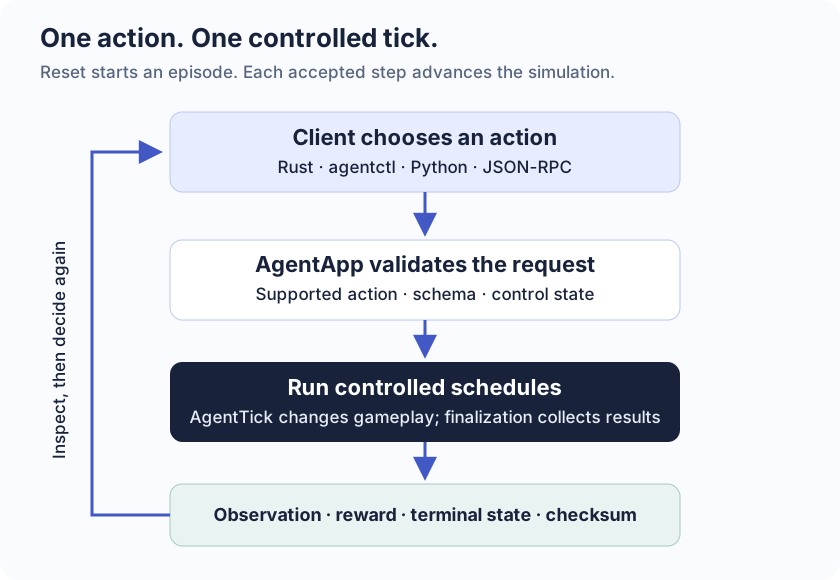
One action, one controlled tick
| Phase | What happens | Your responsibility |
|---|---|---|
| Reset | Start a new episode at tick zero | Initialize every authoritative field and choose a seed |
| Decide | A client or AgentDecision chooses an action | Use the game's supported action catalog |
| Tick | The runtime runs the controlled schedules | Run gameplay in AgentTick and order dependent systems |
| Inspect | Finalization returns observation, reward, terminal state, and checksum | Expose useful state and include all gameplay state in checksums |
A render frame is not a simulation tick. A headless environment can perform thousands of controlled ticks without creating a window. A rendered game can present the same authoritative state while waiting for its next action.
What the client receives
A step response describes the completed tick:
{
  "tick": 1,
  "observation": { "kind": "Domain", "tick": 1, "value": { "count": 1 } },
  "reward": 0.0,
  "done": false,
  "truncated": false,
  "checksum": { "tick": 1, "hash": 12339473019706932269 }
}This is an abbreviated counter response; the real response also includes info. An observation is the state you choose to expose to a client. A checksum may include additional hidden gameplay state. Reward evaluates the completed transition. done ends an episode through game rules; truncated records an imposed stop. Check both before sending another action.
Authoritative state
Include any value that can change a future gameplay outcome: positions, velocities, inventory, objectives, seeded RNG state, cooldowns, queued actions, and hidden state such as the last movement direction.
Rendering, audio, sockets, debug overlays, and UI are presentation or transport state. Keep them outside gameplay snapshots and rebuild presentation after a restore.
A useful question is: If this value disappeared during restore, could the next action behave differently? If yes, it probably belongs in authoritative state.
Save a state or reconstruct a tick
A snapshot captures registered state. Restoring it replaces the current authoritative state after validation. Replay records accepted inputs and reconstructs later state from a checkpoint. Branching creates another history from an earlier tick so you can compare decisions.
Snapshots and replay explains when to use each operation.
What determinism requires
Use SimClock, a seeded RNG, stable entity identities, complete snapshot coverage, and explicit system ordering. Run authoritative gameplay in AgentTick. Install an observation extractor and a checksum extractor before constructing AgentApp.
The library coordinates these contracts; it cannot make arbitrary frame-driven gameplay deterministic. Cross-platform floating-point equivalence is not guaranteed. Checksums detect inconsistency and do not authenticate imported files.
Integrate a Bevy game turns these responsibilities into concrete Rust registration steps.